


Todos os Produtos
-
Sensor de movimento da microonda
-
Sensor de movimento de Dimmable
-
Detectores de presença Sensor
-
driver de led dimmable
-
Pir Motion Sensor
-
Fora do sensor da função
-
Motorista do sensor
-
Sensor da luz do dia
-
Sensor de movimento da C.C.
-
Sensor de movimento do UL
-
Sensor de movimento de DALI
-
sensor de movimentos sem fio
-
Motorista do diodo emissor de luz de DALI2.0 Dimmable
-
DALI Dimmable conduziu o motorista
-
motorista 1-10V conduzido dimmable
-
motorista conduzido dimmable do TRIAC
-
motorista conduzido da emergência
-
Motorista de IOT
Pessoa de Contato :
June Zhao
Detector de ocupação de 24 GHz com contacto NO e contacto NC com entrada AC
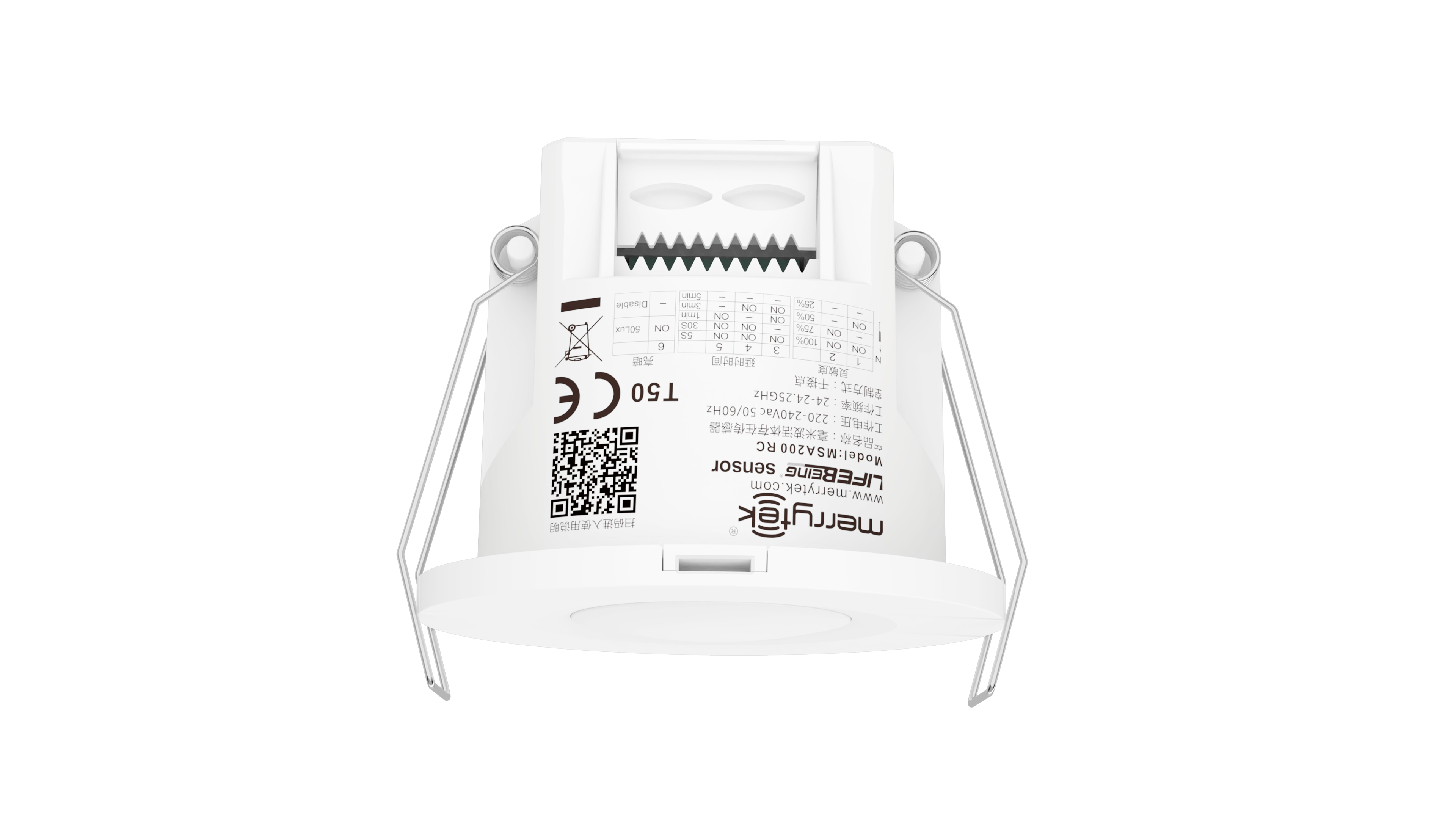

| Lugar de origem | Shenzhen, China |
|---|---|
| Marca | Merrytek |
| Certificação | CE, UKCA |
| Número do modelo | MSA200 RC |
| Quantidade de ordem mínima | 100 PCS |
| Preço | Negociável |
| Detalhes da embalagem | Caixa de cores + caixa de cartão K=K |
| Tempo de entrega | 1, amostra e pequeno pedido: dentro de 5 dias úteis após receber seu pagamento. 2, Ordem em massa: 3 |
| Termos de pagamento | T/T |
| Habilidade da fonte | 10000 PCs/mês |
Detalhes do produto
| Tensão de trabalho | 220-240Vac 50Hz | Modo de trabalho | Contato NA e contato NC |
|---|---|---|---|
| Altura de montagem | 20,5-4,0 m | Vida | 5 anos de garantia@Ta 230V com carga total |
| Versão | Detector de ocupação | Tipo de carga | Resistente, tensão≤36Vdc, corrente: 50mA max |
| Frequência de trabalho | 24 GHz-24,25 GHz | Classificação IP | IP20 |
| Destacar | Detector de ocupação de 24 GHz com entrada AC,Sensor de detecção de presença NO,Sensor de ocupação de contato NC. |
||
Descrição de produto
Detetor de ocupação de 24 GHz com NO Contact e NC Contact com entrada AC
Este detector de ocupação em contacto seco utiliza a tecnologia de radar de ondas milimétricas de 24 GHz para detectar movimento, ligeiros movimentos e sinais respiratórios.permitir a detecção precisa da presença humana, distinguindo alvos humanos e não humanos.
Características fundamentais
- Tecnologia avançada de detecção de seres vivos capaz de identificar movimento, ligeiros movimentos e sinais de respiração
- O design do relé de tubo de cana garante uma operação silenciosa, ideal para aplicações hoteleiras
- Tamanho de instalação compacto adequado para edifícios inteligentes, hotéis inteligentes, escritórios inteligentes e sistemas de detecção de presença
- 24-24.25GHz (banda ISM) radar de ondas milimétricas sem interferência com WiFi 5G e sem penetração através de paredes sólidas
Parâmetros técnicos
| Categoria de parâmetros | Parâmetro | Especificações |
|---|---|---|
| Input/Output | Faixa de tensão | 220-240 V AC 50 Hz |
| Voltagem nominal | 220 V AC | |
| Corrente de trabalho | 50 mA no máximo | |
| Força de trabalho | ≤ 1 W | |
| Parâmetros do sensor | Frequência de trabalho | 24 GHz -24,25 GHz, faixa ISM |
| Potência de transmissão | 5mW Max. 3dBm Max. | |
| Área de detecção | 100% / 75% / 50% / 25% (definido pelo controle remoto MH10 ou interruptores DIP) | |
| Tempo de retenção | 5s/30s/1min/3min/5min/10min/20min (definido pelo Remote) ou 5s/30s/1min/3min/5min (definido pelos DIP) | |
| Sensor de luz natural | 50Lux/Disable (set by DIPs) ou 5Lux/15Lux/30Lux/50Lux/100Lux/150Lux/Disable (set by remote control MH10) | |
| Distância de detecção (100% da área de detecção, raio) | Movimento: 4-5 m (a uma altura de 3 m) Movimento menor: 4-5m (a 3m de altura) Presença: 3-4 m (a uma altura de 3 m) | |
| Meio Ambiente | Temperatura de funcionamento | 0°C...+50°C |
| Temperatura de armazenamento | -40°C...80°C Umidade:≤85% (sem condensação) | |
| Classificação IP | Proteção IP20 | |
| Padrão de certificado | Certificado | FCC/RED |
| Requisitos ambientais | RoHS |
Funções de detecção

O sensor detecta a caminhada humana, ligeiros movimentos (como movimento do corpo, virar a cabeça e outros movimentos menores) e respiração para permitir a detecção da presença humana em estados de não sono.
- Sinalização de movimento:Grandes movimentos que desencadeiam a ativação do sensor na área de detecção
- Sinais de movimento ligeiro:Movimentos muito pequenos, incluindo inclinar-se para a frente, inclinar-se para trás, balançar o corpo, tremer a cabeça, digitar e usar o celular
- Sinais de respiração:Detecção de padrões respiratórios através da dilatação da cavidade abdominal e torácica
Dimensões (unidade: mm)
Diagrama de fiação
Estrutura interna
Instruções de instalação
Instalação em flush
- Corta um buraco de 55 mm no tecto.
- Remover a tampa de enxaguante usando uma chave de fenda de cabeça plana
- Conecte o fio ao terminal
- Instalar a tampa do fio e pressionar o fio com segurança
- Dobrar a pinça de mola para trás para empurrar para o buraco do teto pré-aberto
- Assegurar uma instalação estável e fiável
Instalação na superfície
- Cortar a parede fina reservada para o fio
- Fixar o produto na superfície de montagem alvo com parafusos correspondentes
- Conecte o fio de entrada para o terminal de fiação e feche a tampa bem
- Remova a tampa superior com uma chave de fenda de lâmina plana
- Ajustar os interruptores DIP e parâmetros, em seguida, substituir a tampa superior
- Empurre o produto para o assento do teto até que a fivela fique seguramente
- Para remover, inserir uma chave de fenda de lâmina plana na abertura de desmontagem e furar para baixo
- Assegurar a estabilidade e a fiabilidade após a instalação
Padrão de detecção
Notas importantes:
- A faixa de detecção varia com base no tamanho da pessoa, material, espessura da cobertura e fatores ambientais
- Os sinais de onda milimétrica podem penetrar materiais não metálicos como vidro e paredes finas, mas não podem penetrar paredes grossas de carga ou portas metálicas
Configurações do controle remoto
As configurações de controle remoto suportam ajuste de sensibilidade, configuração de atraso, controle ON / OFF, funções de redefinição, configurações de movimento do sensor e comutação de luz do indicador.
Processo de inicialização
Após a primeira ligação, o sensor entra no modo de auto-teste durante 20 segundos antes de passar para a operação normal.Não são detectados sinais de movimento externos e não são recebidos sinais de comando remoto.
Configurações padrão de fábrica
- Área de detecção: 100%
- Tempo de espera: 1 minuto
- Sensor de luz diurna: Desativado
- Luz indicadora: Ativada
Configurações do interruptor DIP
Configurações da área de detecção
| Interruptor 1 | Interruptor 2 | Área de detecção |
|---|---|---|
| Ativado | Ativado | 100% |
| - | Ativado | 75% |
| Ativado | - | 50% |
| - | - | 25% |
Mantenha as configurações de tempo
| Interruptor 3 | Interruptor 4 | Interruptor 5 | Tempo de retenção |
|---|---|---|---|
| Ativado | Ativado | Ativado | Cinco segundos. |
| - | Ativado | Ativado | Trinta segundos. |
| Ativado | - | Ativado | 1 minuto |
| Ativado | Ativado | - | Três minutos. |
| - | - | - | Cinco minutos. |
Configurações do Sensor de Luz Diurna
| Interruptor 6 | Nível de luz |
|---|---|
| Ativado | 50 Lux |
| - | Desativar |
Quando definida como "desativada", a luz acende-se quando for detectado movimento, independentemente do nível de luz ambiente.
Orientações de aplicação
- A instalação deve ser feita por um eletricista qualificado
- Mantenha-se longe de placas de metal grandes, vidro e materiais de alta densidade para evitar falsos disparos
- Evitar a instalação perto de circuitos de alta corrente que possam afetar o funcionamento do produto
- Ao instalar várias unidades, certifique-se de que as superfícies das antenas são paralelas e espaçadas a mais de 1 m de distância
- Evitar que as superfícies da antena estejam voltadas para fontes de alimentação de acionamento AC e dispositivos de alta potência
- Evitar objetos vibratórios de longa duração perto do produto
- Impedir que a luz desnecessária ilumine a janela de detecção do sensor de iluminação
- Selecionar a área de detecção adequada com base nas dimensões da sala:
- 25% para quartos com cerca de 2 m ou menos (banheiros, salas de estar)
- 50% para quartos com cerca de 3 m (banheiros, corredores, salas de estar)
- 75% para salas de aproximadamente 4 m (pequenos escritórios, salas de reuniões, bibliotecas)
- 100% para salas com cerca de 5 m ou mais (grande escritórios, salas de reuniões, bibliotecas)
- Distância de detecção varia com base na velocidade de movimento, tamanho do objeto, altura de instalação, ângulo e fatores ambientais
- As especificações e parâmetros do produto podem ser otimizados sem aviso prévio
Produtos recomendados